OAuth & Client Registration
This page explains what happens when an MCP client signs in to ABsmartly with OAuth: which endpoints it calls, how it gets registered, and why some clients are accepted while others are rejected. You don't need any of this to connect a supported client, because the client does it all for you. It is useful when you connect a client that isn't listed in Setup, or when you need to debug a failed connection.
Two ways to connect with OAuth
You can reach the MCP server at two addresses. Both use OAuth 2.1 with the authorization code flow and PKCE, but the parties involved are different.
| Hosted server | Your instance's /mcp endpoint | |
|---|---|---|
| MCP URL | https://mcp.absmartly.com/mcp (or /sse) | https://your-instance.absmartly.com/mcp |
| Transports | Streamable HTTP and SSE | Streamable HTTP |
| OAuth authorization server | mcp.absmartly.com, which in turn signs you in through your instance | Your ABsmartly instance |
| Token the client holds | An MCP access token (1 hour) plus a refresh token (30 days) | Your ABsmartly session token, which expires after 24 hours without use (no refresh token) |
| Consent page | Shown once per client and instance, then remembered in that browser for 30 days | Shown on every authorization |
| Instance URL | Passed as ?absmartly-endpoint=…, or entered in the browser | Implied by the URL |
In both cases you sign in with your normal ABsmartly login, whether that is SAML, SSO or email and password. The MCP client never sees your password.
Hosted server (mcp.absmartly.com)
The hosted server runs two OAuth flows in a row. Toward your MCP client it is the authorization server: it registers the client, shows the consent page and issues the client's tokens. Toward your ABsmartly instance it is itself an OAuth client: it sends you to your instance to sign in, then keeps the resulting ABsmartly session token on the server side.
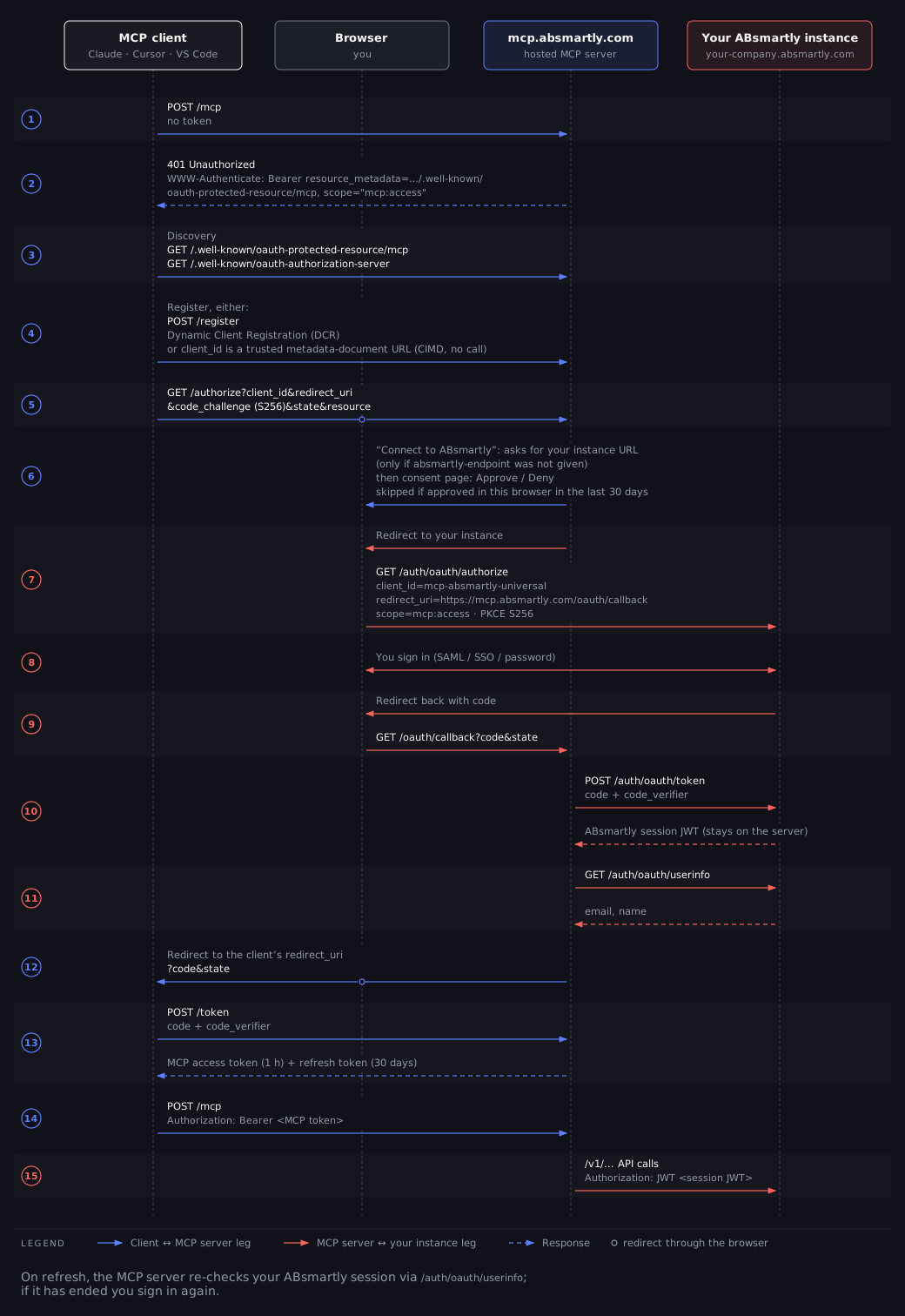
Select the diagram to open it full size.
Step by step:
- The client calls
POST /mcpwithout a token and gets401 Unauthorizedwith aWWW-Authenticateheader that points to the protected-resource metadata and asks for themcp:accessscope. - The client reads the discovery documents:
/.well-known/oauth-protected-resource/mcpand/.well-known/oauth-authorization-server. - The client registers, either through
POST /registeror by using a trusted metadata-document URL as itsclient_id. - The client opens
/authorizein your browser, with a PKCES256code challenge. - If the URL didn't include
absmartly-endpoint, a Connect to ABsmartly page asks for your instance URL. Then the consent page asks you to Approve or Deny the client. mcp.absmartly.comredirects your browser to your instance's/auth/oauth/authorize, where you sign in.- Your instance redirects back to
https://mcp.absmartly.com/oauth/callback. The hosted server exchanges the code at your instance's/auth/oauth/tokenand reads your name and email from/auth/oauth/userinfo. - Your browser is redirected back to the MCP client with an authorization
code, which the client exchanges at
POST /token. - The client calls
/mcpwithAuthorization: Bearer <token>. The hosted server calls your instance's/v1API on your behalf.
When the client refreshes its token, the hosted server first checks that your ABsmartly session is still valid. If it has ended, the refresh fails and the client asks you to sign in again.
Your instance's /mcp endpoint
Your ABsmartly instance also serves MCP directly at
https://your-instance.absmartly.com/mcp. Here the instance is both the MCP
server and the OAuth authorization server, so there is only one flow.
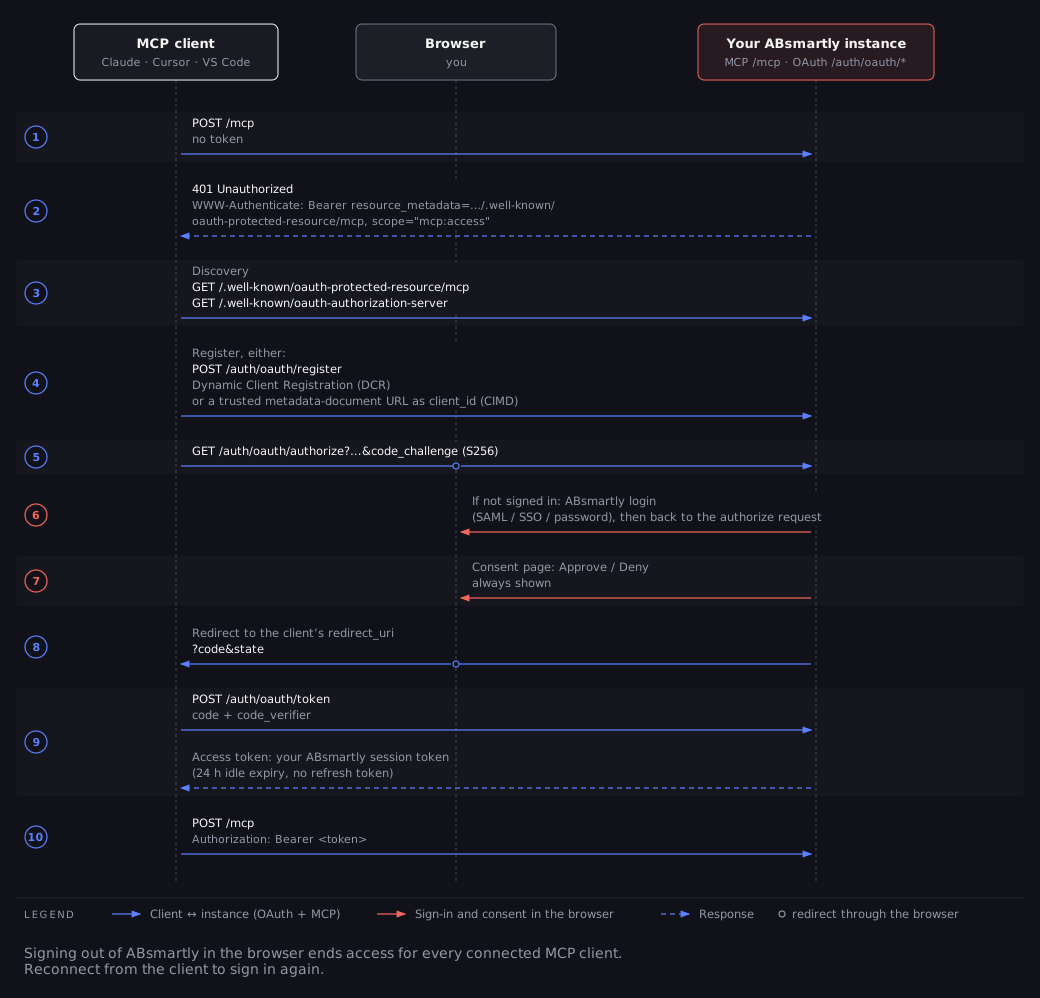
Select the diagram to open it full size.
The token your MCP client receives is tied to the browser session you approved it from:
- It expires after 24 hours without use. Each use extends it, and keeps that browser session alive.
- Signing out of ABsmartly in that browser ends access for every MCP client you approved from it. Reconnect from the client to sign in again.
- Revoking the token signs that browser out of ABsmartly. Because the
token is the browser session, a revocation request
(
POST /auth/oauth/revoke) ends the session, and with it the access of every other MCP client you approved from that browser. Disconnecting a client without revoking the token leaves the session active until it expires or you sign out. - There is no refresh token. When the token expires, the client starts the flow again.
Endpoints
All of these are standard OAuth endpoints. Your MCP client discovers them
automatically from the .well-known documents. You only need to call one
yourself when you register a client manually.
| Purpose | Hosted (https://mcp.absmartly.com) | Your instance (https://your-instance.absmartly.com) |
|---|---|---|
| MCP (Streamable HTTP) | POST /mcp | POST /mcp |
| MCP (SSE, legacy) | GET /sse | Not available |
| Protected-resource metadata (RFC 9728) | GET /.well-known/oauth-protected-resource/mcp | GET /.well-known/oauth-protected-resource/mcp |
| Authorization-server metadata (RFC 8414) | GET /.well-known/oauth-authorization-server | GET /.well-known/oauth-authorization-server |
| Dynamic client registration (RFC 7591) | POST /register | POST /auth/oauth/register |
| Authorization and consent | GET /authorize | GET /auth/oauth/authorize |
| Token | POST /token | POST /auth/oauth/token |
| Token revocation (RFC 7009) | POST /token | POST /auth/oauth/revoke |
| User info | Not available | GET /auth/oauth/userinfo |
Both servers support:
| Setting | Value |
|---|---|
| Grant type | authorization_code (the hosted server also issues refresh_token) |
| PKCE | Required, S256 only. plain and missing challenges are rejected. |
| Client authentication | none (public clients), client_secret_basic, client_secret_post. A client that registers without choosing one gets client_secret_basic. |
| Scopes | mcp:access (default) and user:info |
| Client ID metadata documents | Supported, for trusted clients only |
The mcp:access scope grants the same access you have in the ABsmartly Web
Console. The MCP client can do anything you can do, so only approve clients
you trust.
How a client gets accepted
An MCP client can be accepted in one of four ways. The client picks the first one it supports. Most clients need no setup from you.
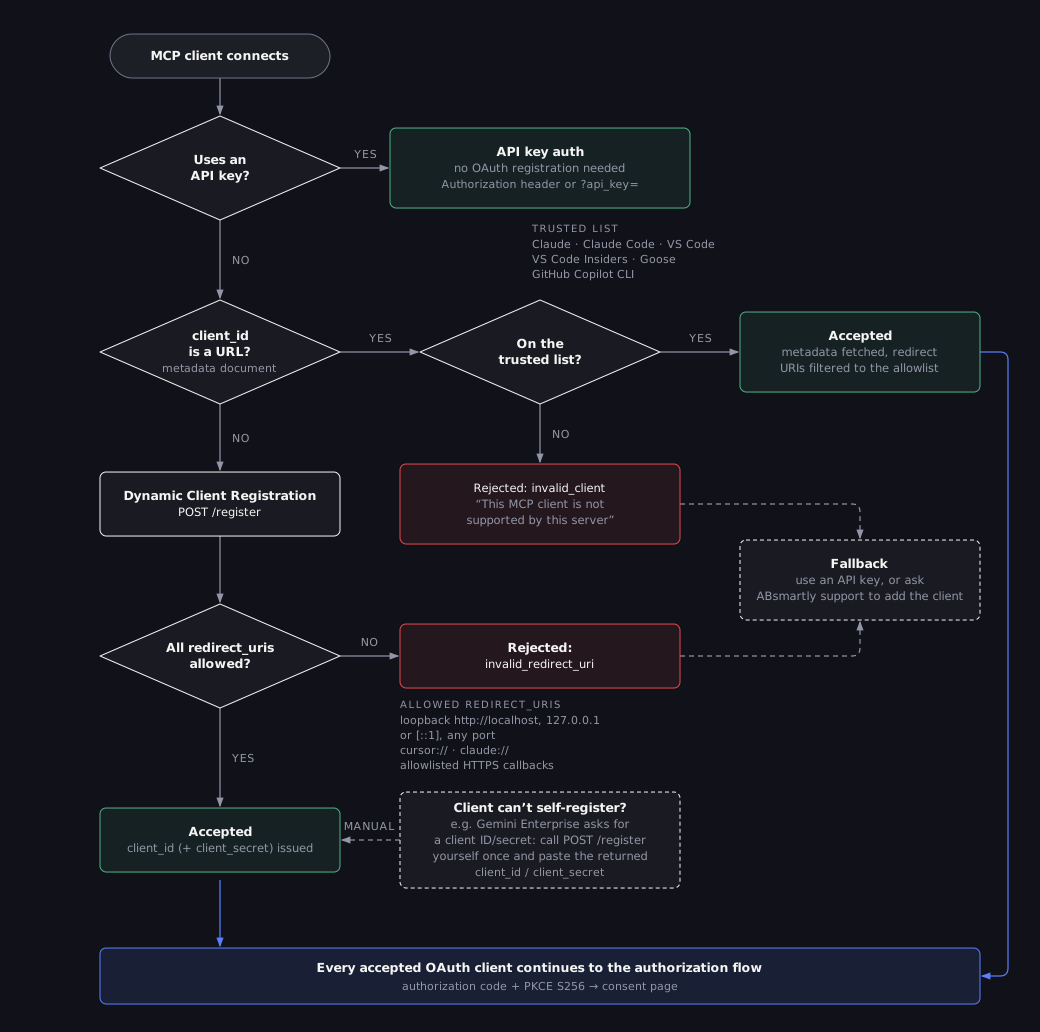
Select the diagram to open it full size.
Client ID metadata documents
Some clients don't register at all. Instead their client_id is an HTTPS URL
that points to a JSON document describing the client. ABsmartly fetches the
document only if the URL is on this trusted list:
| Client | Metadata document URL |
|---|---|
| Claude (claude.ai, Claude Desktop, mobile) | https://claude.ai/oauth/mcp-oauth-client-metadata |
| Claude Code | https://claude.ai/oauth/claude-code-client-metadata |
| VS Code | https://vscode.dev/oauth/client-metadata.json |
| VS Code Insiders | https://insiders.vscode.dev/oauth/client-metadata.json |
| Goose | https://goose-docs.ai/oauth/client-metadata.json |
| GitHub Copilot CLI | https://github.com/copilot/cli/client-metadata.json |
Any other URL used as a client_id is rejected with invalid_client, without
being fetched. The hosted server returns the message "This MCP client is not
supported by this server", and your instance returns "Unknown client".
Redirect URIs listed in a trusted document are still checked against the
redirect URI allowlist.
Dynamic client registration
Clients that don't use a metadata document register themselves by calling the registration endpoint with their name and redirect URIs. This is how Cursor, ChatGPT, Windsurf, Gemini CLI, Zed, MCP Inspector and most other clients connect.
Registration succeeds only if every redirect URI is on the
allowlist. Otherwise it fails with
invalid_redirect_uri and the message "One or more redirect_uris are not
allowed".
Registered clients expire after 90 days. On the hosted server the 90 days
count from registration, whether or not the client is used. On your instance
they count from the last use. If a client that used to work starts failing
with invalid_client, remove and re-add the connector so it registers again.
Manual registration
Some platforms can't register themselves and ask you for a client ID and client secret instead, for example Gemini Enterprise. In that case, register the client yourself once, then paste the result into the platform:
curl -X POST https://mcp.absmartly.com/register \
  -H "Content-Type: application/json" \
  -d '{
    "client_name": "Gemini Enterprise",
    "redirect_uris": ["https://vertexaisearch.cloud.google.com/oauth-redirect"],
    "token_endpoint_auth_method": "client_secret_basic"
  }'
The response contains a client_id and a client_secret. Use the platform's
real callback URL as the redirect URI, and it must be on the
allowlist. Keep the client secret private, and
register again if the client expires.
The example registers client_secret_basic, which matches the default of
most platforms (for example Use HTTP Basic Authentication in Gemini
Enterprise). If your
platform sends the secret in the request body instead, register
client_secret_post. Keep the registered method and the platform's setting
the same. The client must use PKCE
with S256; enable PKCE in the platform if it's optional there.
Some platforms only generate their callback URL when you create the
connection. Create the connection first with
placeholder credentials, copy the callback URL it returns, register a client
with that URL, then update the connection with the new client_id and
client_secret.
API key
If your client can't use OAuth at all, or isn't on the allowlist, connect with an API key instead. API key connections skip OAuth entirely, so no registration is needed. This works with any client that can send an HTTP header or connect to a URL with a query string.
Allowed redirect URIs
A redirect URI is where your browser sends the authorization code after you
approve the client. To stop a malicious client from receiving your access,
ABsmartly only accepts redirect URIs from this list. URIs that contain a
fragment (#…) or embedded credentials are always rejected.
| Kind | Allowed values | Used by |
|---|---|---|
| Loopback | http://localhost, http://127.0.0.1 and http://[::1], on any port and path (RFC 8252) | Claude Code, Gemini CLI, Goose, GitHub Copilot CLI, Windsurf, Zed, Kiro, MCP Inspector, the ABsmartly CLI and other local apps |
| Custom schemes | cursor://…, claude://… | Cursor and Claude desktop apps |
| Claude | https://claude.ai/api/mcp/auth_callback, https://claude.com/api/mcp/auth_callback | claude.ai, Claude Desktop |
| ChatGPT | https://chatgpt.com/connector_platform_oauth_redirect, https://chatgpt.com/connector/oauth/… | ChatGPT connectors |
| VS Code | https://vscode.dev/redirect, https://insiders.vscode.dev/redirect | VS Code, VS Code Insiders |
| Cursor | https://www.cursor.com/agents/mcp/oauth/callback | Cursor background agents |
| Cloudflare | https://playground.ai.cloudflare.com/oauth/callback | Cloudflare AI Playground |
| Productboard | https://integrations.productboard.com/oauth2/callback | Productboard |
| Perplexity | https://www.perplexity.ai/rest/connections/oauth_callback, https://enterprise.perplexity.ai/rest/connections/oauth_callback | Perplexity, Perplexity Enterprise |
https://vertexaisearch.cloud.google.com/oauth-redirect | Gemini Enterprise | |
| Microsoft | https://global.consent.azure-apim.net/redirect and https://global.consent.azure-apim.net/redirect/<connector-id> | Microsoft Copilot Studio, Azure AI Foundry |
| Amazon | https://bedrock-agentcore.<region>.amazonaws.com/identities/oauth2/callback/<uuid> | Amazon Bedrock AgentCore |
HTTPS redirect URIs must match the listed scheme, host and path. The
allowlist check ignores the query string. However, when the client starts
sign-in, the redirect URI it sends must match the one it registered exactly,
query string included, or authorization fails. Entries shown with …, <connector-id>, <region> or
<uuid> accept any value in that position. Plain http:// is only accepted
for the loopback addresses.
The Perplexity, Google, Microsoft and Amazon callbacks are shared by every customer of those platforms, so they don't identify whose connector will receive the access. The consent page shows a warning for these hosts. Only approve when you have just started the connection yourself.
These platforms connect from their own cloud. Connect them to the hosted server URL, as shown in Setup.
Your client isn't on the list?
If your MCP client is rejected and isn't covered above:
- Use an API key. It works with any client and needs no registration. See Authentication.
- Ask for the client to be added. Contact ABsmartly support with the client's name and its redirect URI or metadata-document URL. You can also open an issue on github.com/absmartly/mcp.
Self-hosted clients with a callback on your own domain, for example LibreChat, Open WebUI or self-hosted n8n, can't be added to the shared allowlist. Use an API key for these.
The consent page
ABsmartly shows an Authorize Access page before any client receives
access. On the hosted server it appears before you sign in to your instance;
on your instance's own /mcp endpoint it appears after you sign in. It shows:
- the name of the client asking for access,
- the ABsmartly account that will be shared (on the hosted server, the instance URL), and the site the access will be sent to,
- what the client will be able to do, and
- Approve and Deny buttons.
Extra warnings appear when the access goes to an app on your own computer (loopback redirect) or to a shared cloud platform. Only approve a request you started yourself from your own MCP client.
The consent request expires after 10 minutes, and it must be completed in the same browser that started it. If it expires, restart the connection from your MCP client.
Related
- Authentication — API keys, header formats and the security model
- Setup — per-client configuration
- Troubleshooting — what each OAuth error means