December 2025
Overview
This release is all about Metrics. As part of our broader initiative to improve metric governance, we’ve introduced powerful new capabilities to help you better manage, understand, and select the right metrics for your experiments.
General improvements
We've made some general improvements to Metrics that you will see across the platform.
New Metric Categories type
We've added a new configuration type that helps categorise and group metrics. Those new metric categories will make it easier to find the right metrics when creating an experiment.
While the categories should reflect your own needs, here is a list of possible metric categories you can add to your ABsmartly:
Conversion: Measures whether users complete a desired action.Revenue: Captures direct monetary impact.Engagement: Reflects how actively users interact with the product.Retention: Shows whether users come back or continue using the product over time.Performance: Measures speed and responsiveness, such as load time or latency.Reliability: Tracks stability and correctness, including errors, failures, or availability.Quality: Represents outcome quality or user experience signals like cancellations, refunds, or unsuccessful outcomes.
New metric's metadata fields
We've added new metadata fields to metrics that help with discoverability and filtering across the platform. This includes:
- Unit type: This is the list of Unit type(s) for which this metric is computed. Setting the correct Unit type(s) will help experimenters choose the right metric for their experiments. (e.g. user_id, device_id)
- Application: This is the list of Application(s) where this metric makes sense. For example, an
app_crashesmetric only makes sense for experiments running on app platforms. - Metric category: This is the category the metric belongs to. This will make your metric more discoverable. See above.
All those fields are optional, but we recommend you update your existing metrics as this will improve general discoverability of your metrics.
Metric View page
You can now click on the name of any metric across the platform to open the metric's view page. This page will give you a readable overview of the metric and will be the new entry point for managing metrics (editing and creating new versions) as well as many new upcoming features.
Improved Metric Discoverability
We’ve made it easier to find, understand, and select the right metrics when creating your experiments/templates/features.
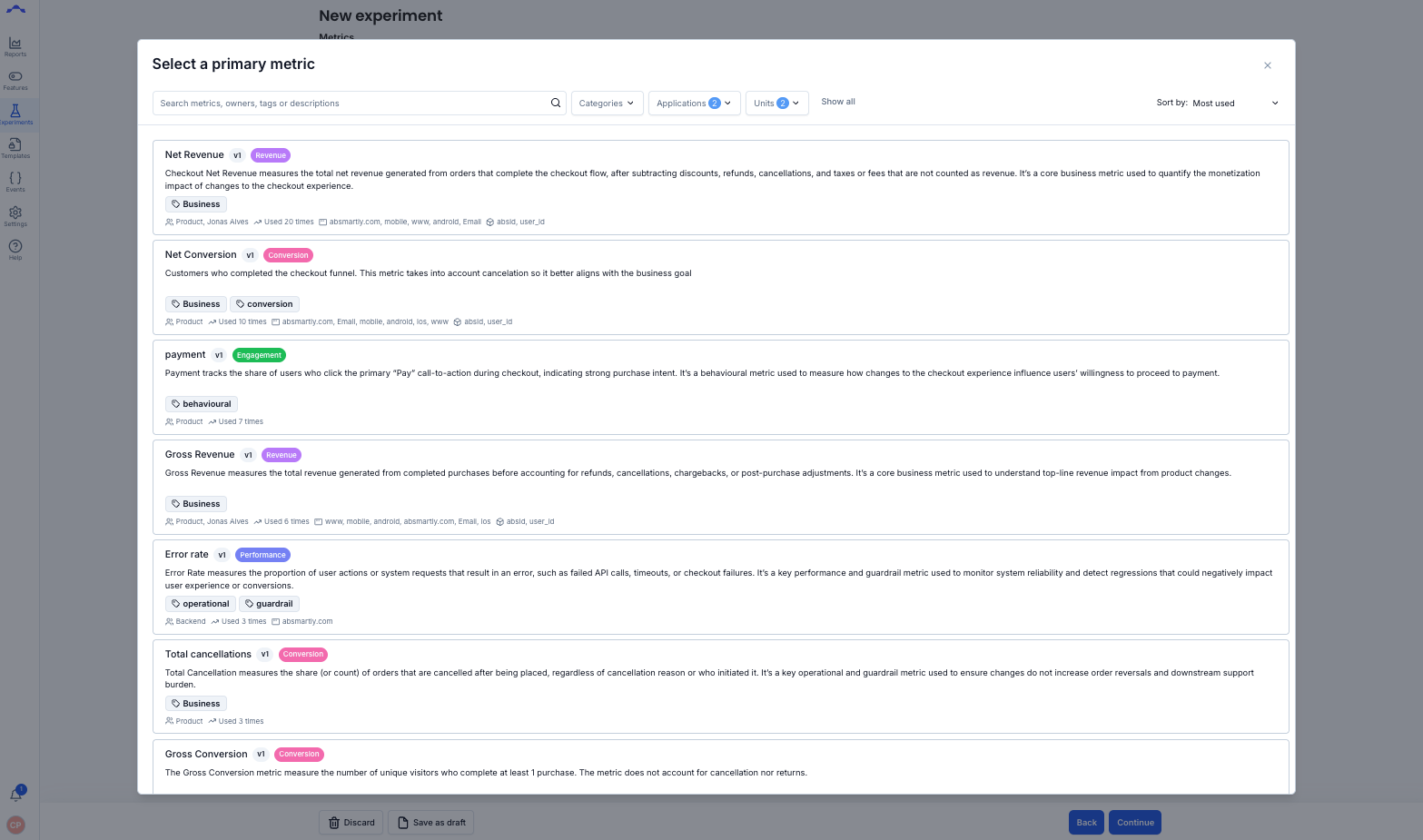
Usability improvement
We totally redesigned the metric selection step of the experiment setup. The goal of the new UI is to make it easier to find and add the right metrics for your experiments.
Smarter metric selection in experiments
The metric selection step will show by default the most relevant metrics based on the chosen unit type and application (make sure to update your metric metadata to get the most out of this new feature).
Metrics can now also easily be searched by name, tags, owners, etc so you don't have to scroll through your long list of existing metrics to find what you are looking for.
Usage insights
While adding metrics to your experiments/templates/features, you can now see how often a metric has been used in past experiments to help you assess its relevance and importance.
To get the most out of these improvements, we recommend reviewing your existing metrics, filling in missing metadata, and adding clear descriptions where needed.
Metric Versioning (Foundations)
A key part of metric governance is version control, ensuring that metric definitions are transparent, traceable, and stable over time. This release lays the groundwork for more robust version management in the future.
Metric versioning is a critical part of metric governance as it allows for a metric to evolve overtime without risking impacting previous experiments and decisions made using an older version of that metric.
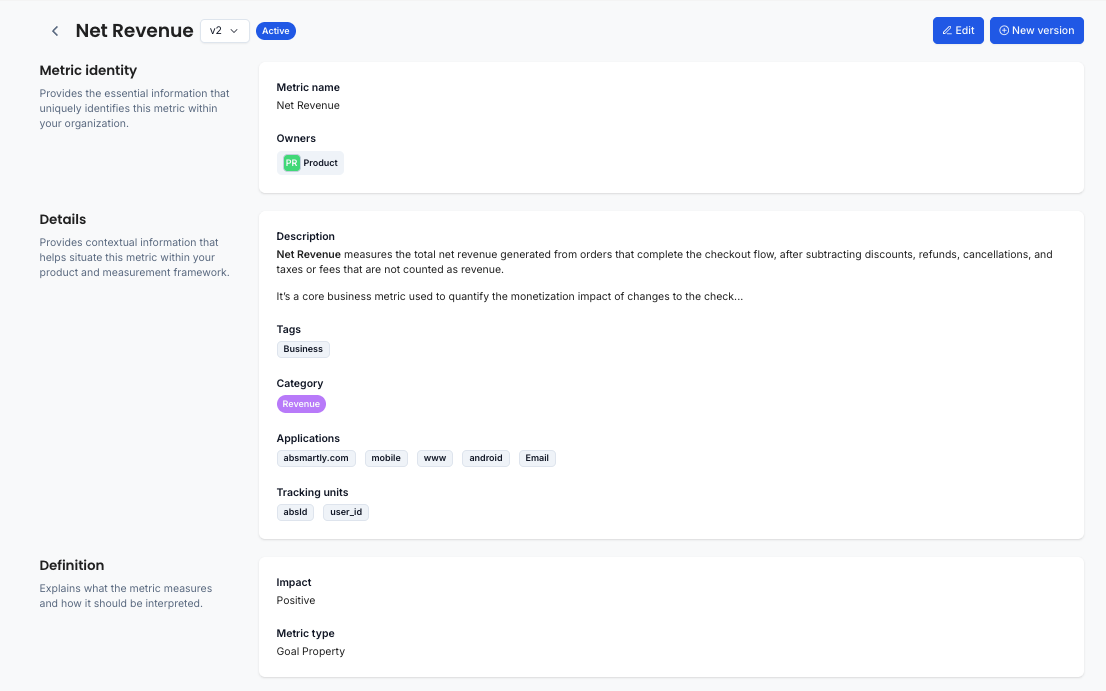
Metric versioning 1.0
It is now possible for metric owners to create a new version of an existing metric. This can be done, for example, when the definition of a metric change.
- Creating a new version of a metric will not impact past and running experiments/features which are using a previous version of that metric.
- Only the latest version of a metric will be discoverable and can be added to new experiments. Experimenters will only be able to see the latest version of each metric.
- Experiments/Features cannot be started when they use an outdated version of a metric. Experimenters will be asked to update to the latest version before they can start the experiment/feature.
Edit vs New Version
With the launch of metric versioning, some fields can be edited in the current version of the metric while others will require a new version to be created.
- Editable fields: Fields like Description, Tags, Category, Applications, Tracking units can safely be updated without changing the definition of a metric.
- Non-editable fields: All other fields which might have an impact on how the metric is computed or how the result might be interpreted cannot be edited and a new version of the metric will need to be created to be able to change them.
As a metric owner, you will be able to edit and create new version from the new Metric view page.
If you are using our API to edit your metrics, you will need you update your script as you will no longer be able to edit all metric fields using the edit end-point.
A new end-point for creating new metric versions is now available if needed.
What’s Next
We’re continuing our focus on general metric improvements and metric governance in the coming sprints. Upcoming improvements include:
- CUPED support
- Metric lifecycle
- Metric approval workflows
- Metric usage overviews and reporting
These updates are part of our broader effort to improve trust, transparency, and governance around metrics.
Questions or Feedback?
As always, if you have questions about this release or want to talk about how to get more out of your metrics, reach out to us anytime.