Overview
What is an experiment
An experiment evaluates the impact of a product change by comparing the behaviour of users who see the change with those who do not. ABsmartly makes this possible by assigning users to variants, tracking their actions with goal events, and analysing the difference between variants with reliable statistics.
An experiment contains several key elements:
-
Exposure How users enter the experiment and how they are assigned to variants.
-
Variants Different experiences shown to users.
-
Goals and Metrics Events and measurements used to evaluate the impact.
-
Monitoring Automatic checks that help ensure the experiment is healthy and safe to run.
-
Results and Decisions The analysis of variant impact and the decision you take once the data is clear.
ABsmartly handles all randomisation, data collection, metric computation, and statistical inference so you can focus on learning from your product changes.
Exposure and assignment
When a user reaches an experiment, ABsmartly assigns them to a variant using a deterministic hashing method. This ensures:
- stable assignment
- no cross contamination across variants
- consistent behaviour during the entire experiment
- predictable control of traffic allocation
Exposure events are sent automatically by the SDK, and these events define when users become part of the analysis dataset.
Variants
Experiments usually include a control variant and one or more treatment variants. Each variant represents a specific user experience. ABsmartly allows you to configure:
- variant names
- traffic allocation
- rollout rules
- targeting rules
- experiment overrides for testing or QA
Variants determine what users see, while the metrics determine how those differences are evaluated.
Goals and metrics
Experiments are measured using goals and the metrics derived from them.
Examples of goals:
context.track("purchase", { price: 1000 });
context.track("add_to_cart", { product_id: "ABC123" });
context.track("view_item", { item_id: "XYZ987" });
Metrics take your goal events and turn them into meaningful measurements of user behaviour. They let you answer questions like:
- how many times something happened
- how many users performed an action
- how much value was generated
- how behaviour changes between variants
ABsmartly handles all the computation and presents the results in a clear, comparable way across variants.
Guardrails and monitoring
Before experiment results can be trusted, ABsmartly performs several health checks automatically:
- Sample Ratio Mismatch at the experiment level
- assignment and exposure conflicts
- guardrail metric thresholds
- unexpected behaviour in exposure or goal events
- data quality anomalies
Guardrails help detect harmful side effects and make it possible to abort experiments if needed.
You can also configure guardrail metrics with thresholds that alert you when impact crosses meaningful limits, for example when a performance metric becomes slower or when a business KPI shows a potential drop.
Analysing results
ABsmartly uses sound statistical methods to compute the impact of each variant compared to control. For each metric you will see:
- visitor count
- total value
- mean value per user
- relative impact
- confidence interval
- impact per day
You can use our guide on interpreting metrics results to help with the analysis step.
Decisions
Once results are stable and clear, you can record a decision:
Full on The treatment performs well enough to roll out fully.
Keep Current Keep the current implementation and either iterate or abandon.
Abort The experiment produced a harmful effect or a technical issue made results invalid.
Decisions are tracked across the platform to support transparency, accountability, and long-term learning.
Analysis methods
ABsmartly supports two types of statistical analysis: fixed horizon and group sequential. Both methods compare variant performance, but they differ in how and when you can look at the results. Understanding the differences between these methods and knowing when to use each can significantly impact the efficiency and accuracy of your experimentation program.
Fixed horizon
Fixed Horizon Testing involves analyzing the results of an experiment after reaching a predefined sample size (number of unique visitors) or reaching a specific duration. This method, supported by most AB Testing tools, assumes that the sample size is defined before the experiment starts and remains unchanged throughout the runtime of the experiment.
While this method is widely used and beneficial, it lacks flexibility, as decisions can only be made at a single predefined moment. This limitation can lead to unreliable decisions (when experimenters make decisions too early) as well as wasted time and resources. This makes the use of Fixed Horizon testing for product experimentation, where trust, speed, and agility are crucial, less beneficial and more challenging. This is especially true for teams with less experience.
Fixed horizon uses a 2-sided test, meaning it evaluates whether the observed effect is significantly in either direction (positive or negative). Results in a 2 sided-test can be significantly positive, significantly negative or insignificant.
Group sequential
Group Sequential Testing is an adaptive analysis method that allows for interim analyses at various points during the experiment. At ABsmartly you can decide how often or how many interim analyses you want. A Group Sequential approach provides the flexibility to stop the experiments early for efficacy or for futility.
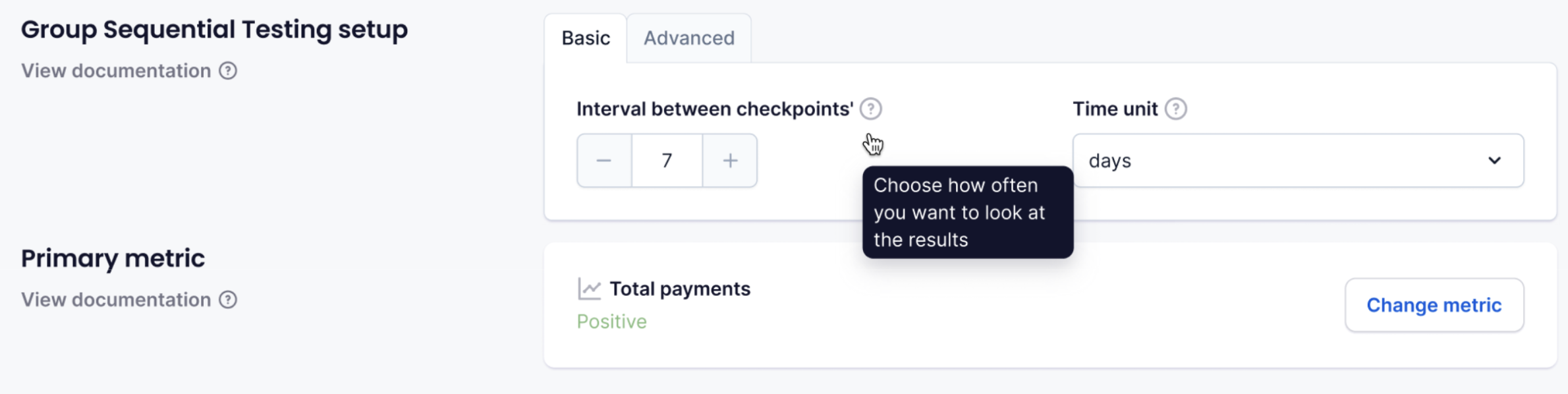
While adding more interim analysis will slightly reduce statistical power compared to fixed-horizon testing, overall it greatly speeds up decision-making, as significance is commonly reached before the full sample is collected. This efficiency gained from using Group Sequential Testing is making a real difference to ABsmartly customers, to the pace at which decisions can be made.
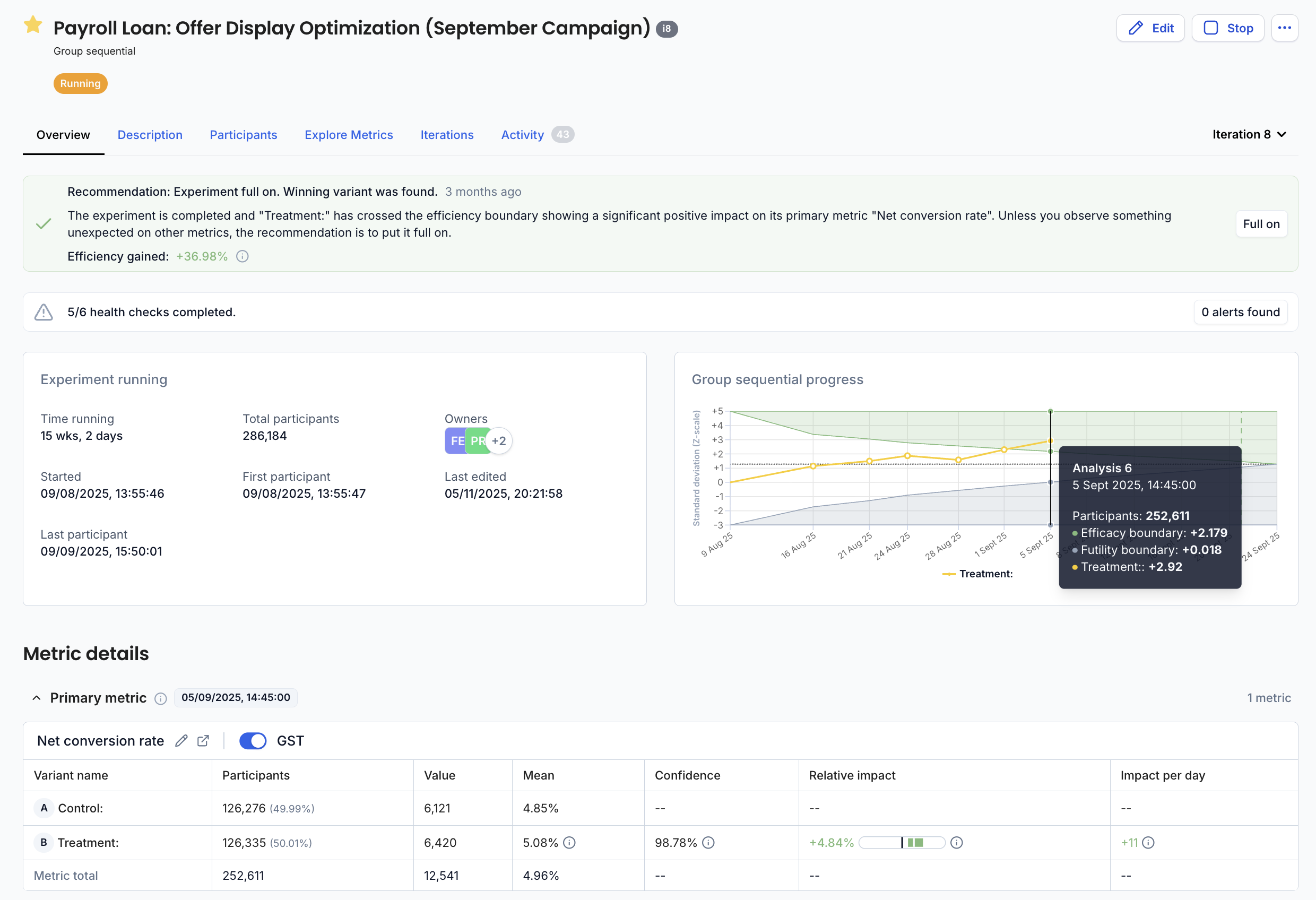
Unlike Fixed Horizon, Group Sequential Testing uses a 1-sided test, meaning it evaluates whether the observed effect is significant only in the expected direction. Results in a 1-sided test can either be significant in the expected direction or insignificant.
Different experimentation platforms might use different sequential testing implementation. The most commonly used sequential method is Fully Sequential and while it offers the most flexibility (decisions can be made at any moment in time), it comes at the cost of much lower power which in turn leads to higher time to decision. At ABsmartly we believe Group Sequential Testing provides the right compromise between flexibility and speed which is required to make high-quality product decisions in a fast-moving business context.
How to choose?
Both methods ensure reliable results, but group sequential analysis provides more flexibility, while fixed horizon follows a more traditional “run to completion” approach. Most of the time, Group Sequential Testing should be the preferred method (who does not want faster trustworthy results?), but there are a few use cases where you might decide to use a Fixed Horizon setup. This is mainly when you are dealing with a strong novelty effect (Group Sequential Testing might come to a premature conclusion which might not reflect the true impact) or where you have a long action cycle and wish to observe the visitors for a pre-defined period of time.
Because it is a 2-sided test, Fixed Horizon is a better choice if differentiating between inconclusive and significantly negative results is important.
Server-side vs client-side experiments
ABsmartly supports both server-side and client-side experimentation seamlessly. Each approach has different strengths depending on where the change is implemented and how data flows through your system.
Server-side experiments
Server-side experiments are implemented inside your backend or API layer. The variant assignment happens before the response is sent to the client.
How it works
Your backend receives the experiment key, retrieves the assigned variant from the SDK, and returns different data or logic depending on the variant.
Use cases
- Pricing logic
- Ranking and recommendation algorithms
- API responses
- Feature toggles
- Checkout and order processing
- Any business logic that must run before rendering
Benefits
- High performance and stable assignment
- No flicker or visible changes after load
- Works regardless of device or browser
- Ideal for experiments that influence logic rather than UI
- Better security and protection against manipulation
- Can be shipped immediately without any code change
Things to consider
- Requires backend engineering work
- QA may take longer
- Changes often require deployments
Client-side experiments
Client-side experiments run inside the user’s browser. The SDK assigns a variant, and client-side code applies the appropriate UI changes.
How it works
The frontend calls context.track. The SDK returns the assigned variant, and the UI is updated accordingly.
Use cases
- Simple Layout and visual changes
- Styling and copy updates
- Interaction tweaks
- Landing page optimisation
- Experiments that do not require backend involvement
Benefits
- Very fast iteration
- No backend deployment needed
- Ideal for design and UX teams
- Non-engineers can create visually in the Visual Editor
Things to consider
- Must be implemented correctly to avoid flicker
- Not suitable for logic or sensitive values such as pricing
- Some browsers block scripts which can impact exposure if not configured well
- Network timing can affect when changes appear
- Must be re-implemented fully in code when shipped and before the experiment can be cleaned-up
How to choose
Choose server-side when:
- the change affects APIs, data or business logic
- correctness and performance are important
- full consistency across the user journey is required
Choose client-side when:
- the change is purely visual and simple
- you want fast trial and error
- backend changes are not possible or needed
Many teams use both approaches together. ABsmartly fully supports hybrid experimentation.
Experiment lifecycle
Experiments move through several stages from creation to completion. Each stage reflects where the experiment is in its setup, execution, or decision flow.
Draft
The experiment has been created but is not yet ready to run.
At this stage you typically:
- define the hypothesis
- configure variants
- choose goals and metrics
- set targeting and traffic allocation
Nothing is live, and the experiment is not visible to end users.
Ready
The experiment is fully configured and reviewed.
It can be started in development or production at any time once the team is ready.
No traffic is assigned yet.
Development
The experiment is running in dev mode. During this phase:
- developers add the experiment key and variant logic
- teams QA the experience
- exposure events may appear only from testing environments
The experiment is not yet running for real users.
Running
The experiment is live, and real users are being assigned to variants.
During this stage:
- traffic is split according to the configured allocation
- metrics begin accumulating
- guardrails and monitoring are active
- you can review interim results depending on the chosen analysis method (fixed horizon or group sequential)
- experiment setup can no longer be edited (some metadata can still be edited)
This continues until the experiment is stopped, either when it reaches significance or when it is aborted.
Stopped
The experiment has been manually or automatically stopped.
Common reasons include:
- reaching the predefined horizon
- detecting a harmful effect
- encountering operational issues
- pausing development or product rollout
Traffic is no longer entering the experiment.
Full on
A final decision has been made to fully release the treatment.
In this stage:
- the winning variant is rolled out to one hundred percent of traffic
- the experiment is locked for editing
- results remain accessible for reference
- the decision is tracked in the decision history
This marks the successful completion of the experiment.
Archived
The experiment is closed and archived.
- the code has been cleaned-up of experiment code
- it will not appear in active experiment lists
- results and metadata remain stored for historical context and learning
Archiving keeps your workspace clean while preserving your experimentation history.
Ownership & permissions
Experiments are Managed-Assets and, as such, follow a specific ownership model.
Ownership
An experiment can be owned by 1 or more teams and, if the feature was enabled for your organisation, individual users.
Team ownership is generally a better fit for governance because it creates stability, resilience, and accountability at the right level.
A team persists even when individuals change roles, leave, or shift priorities, so the metric keeps a reliable steward over time. Expertise is usually distributed across a group rather than held by one person, which reduces risks from single-point knowledge and avoids bottlenecks. Team ownership is better suited to review changes, ensure consistency, and maintain quality.
Permissions
The following permissions exist when managing and working with experiments.
Experiment permissions
| Permission | Description |
|---|---|
| Admin experiments | Grants full administrative control over all experiments, including permissions, visibility, and configuration settings across the workspace or team. |
| Archive an experiment | Allows archiving an experiment. Archiving removes it from active lists while preserving all results and metadata. |
| Comment on an experiment | Permits adding comments to an experiment for collaboration, reviews, or decision discussions. |
| Create an experiment | Allows creating a new experiment from scratch or from a template. |
| Create an experiment from template | Permits creating a new experiment specifically using an existing experiment template. |
| Start an experiment in development | Allows setting the experiment status to Development, enabling implementation and QA. |
| Edit an experiment | Grants permission to modify an experiment’s configuration before it is running (variants, goals, metrics, targeting, etc.). |
| Full on an experiment | Allows marking the experiment as Full on, indicating the winning variant is rolled out to all traffic. |
| Get an experiment | Allows viewing a specific experiment and its metrics. |
| List experiments | Grants access to view the list of all experiments in the workspace or team. |
| Restart an experiment | Allows restarting an experiment after it has been stopped, sending new traffic into the experiment. |
| Start an experiment | Allows changing an experiment’s status to Running, making it live for real users. |
| Stop an experiment | Allows stopping a running experiment. New users will no longer enter the experiment. |
| Unarchive an experiment | Allows restoring a previously archived experiment so it becomes active again. |
Global access
Permission to create and manage experiments can be granted to the relevant users through their role at the platform level.
It is not recommended to provide access to metrics to non platform admin users at the platform level.
built-in team level roles
Permission to create and manage experiments can be provided to the relevant users at the team level by granting them the correct role in that team.
| Permission | Description |
|---|---|
| Team Admin | Grants full control over experiments owned by that team. |
| Team Contributor | Grant ability to create, start, stop and to manage experiments in the team scope. |
| Team Viewer | Grant ability to view and list experiments owned by the team. |
Team roles are inherited, so if a user is a Team Contributor in a team, then this user would also be a Team Contributor in all child teams.
Sharing experiments
While experiments are owned by teams, they can be shared with other teams and individual across the organisation.
| Permission | Description |
|---|---|
| can_view | Grants this user or team the ability to view this experiment. |
| can_edit | Grants this user or team the ability to edit/start/stop to this experiment. |