May 2026
Overview
This release brings a long-awaited Metric Changelog, introduces the new activity_per_period metric type, and ships several quality-of-life improvements across the Explore Metrics tab, experiment list, and Events dashboard.
Metrics
Metric Changelog
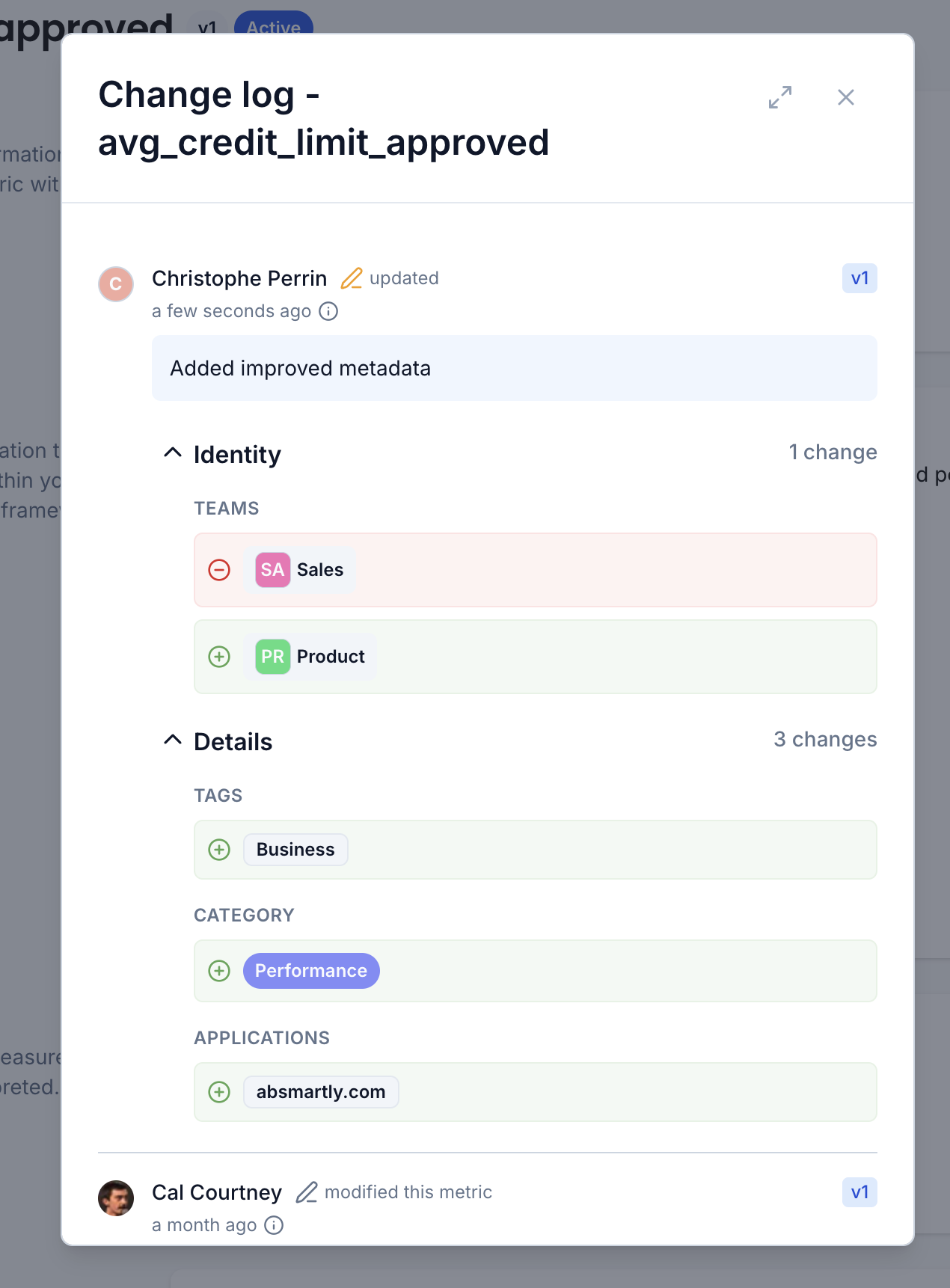
Every metric now has a full change log that captures every modification made over its lifetime, so you always know what changed, who changed it, and when.
Open the change log from any metric to see a chronological timeline of changes, with the most recent at the top. Each entry shows:
- Who made the change, with avatar and name
- When it happened (relative time, with the exact timestamp on hover)
- Which metric version the change produced
- A short summary of the change (e.g. Changed owners, Added metadata)
- Field-level before/after diffs, grouped into collapsible sections such as Identity, Details, Definition Goal, with clear add/remove indicators
This gives teams a complete audit trail for metric governance which is useful for reviews, debugging unexpected results, and understanding the history behind a metric. The same change log will soon be available for other assets like experiments and features.
New Metric Type: activity_per_period
We've added a new metric type, activity_per_period, that measures user activity over a configurable time window (for example, sessions per week or orders per month). It's designed for cases where you care about the frequency of an action per user across a rolling period, rather than a single count or ratio.
See the Activity per Period documentation for more information.
Improved Metrics Discoverability
Finding the right metric on the Explore Metrics tab is now much easier. We've improved how metrics surface in the list, making it faster to locate the metrics you care about when investigating an experiment.
Events
Keyboard Navigation in the Event Details Dialog
The Event Details dialog now supports keyboard arrow navigation, so you can step through events without reaching for the mouse. A small change that makes browsing through long event lists noticeably faster.
Experiments
Custom Assignments (Early Beta)
We're opening up an early beta of Custom Assignments — a new way to define who should be excluded from an experiment and always served a specific variant instead.
Custom Assignments (also known as exclusion rules) are useful for:
- Testing & QA — force yourself or your team into a specific variant to verify the experience, without being counted as a participant.
- Internal or beta users — ensure groups like internal employees or beta testers always see a chosen variant, without polluting experiment data.
Excluded visitors see the configured variant but are not tracked as participants, so the experiment statistics stay clean.
See the Custom Assignments documentation for details on how to configure them.
Custom Assignments are currently in early beta and are only available for the JavaScript SDK. The feature is behind a flag and requires an SDK update before it can be used. If you'd like to enable it for your account, please reach out to our team and we'll help you get set up.
Group Experiment List by Experiment
You can now group the experiment list by experiment, making it easier to navigate large lists especially when working with experiment families or multiple iterations of the same test.
Bug Fixes
This release also includes a number of security, stability and reliability improvements based on feedback from users.
Questions or Feedback?
We're always happy to help, so reach out if you have any questions or want to explore how to make the most of these new capabilities.