June 2026
Overview
This release is headlined by the beta of the new experiment creation form and the new Metric Usage Report (Beta), a dedicated workspace for understanding where every metric is used, by whom, and how its adoption is trending. We're also extending the changelog introduced in May to experiments and feature flags, and adding end-to-end webhook coverage for the export lifecycle so customers can fully automate getting experiment data into their warehouse. On top of that, stopped reasons are now customisable per account.
This release also marks the beginning of the rollout of the data retention policy we pre-announced in November 2025.
Experiments
Experiment Changelog
Following last month's Metric Changelog, every experiment now has the same full change history. The change log captures every modification to an experiment over its lifetime, so you can always see what changed, who changed it, and when.
Each entry shows who made the change, when it happened, a short summary, and field-level before/after diffs grouped into clear sections. This is especially valuable when reviewing why an experiment behaved differently after a mid-flight edit, or auditing how a test evolved from setup to stop.
New Experiment Creation Form (Beta)
We're in the middle of a full redesign of the create / edit experience for experiments, feature flags and templates — same data, same primitives, much sharper UX. We're not there yet, but you can already see how it works for experiments and templates today and give us early feedback while the rest catches up.
The new form is enabled from Platform Settings. Keep in mind that turning it on enables the new experience for all users on your account — it's not a per-user toggle. You can easily switch back to the current version at any time if you'd rather wait while we finish the work on our side.
What to expect from the beta:
- A more responsive, modern UI with cleaner layout and faster interactions
- Inline validation and clearer field-level errors
- The same capabilities as the current form, including experiment templates — you can both create new templates and use them to scaffold experiments directly from the new form
The legacy form is still the default. We're actively collecting feedback before flipping the new form on for everyone, and before extending the redesign to feature flags.
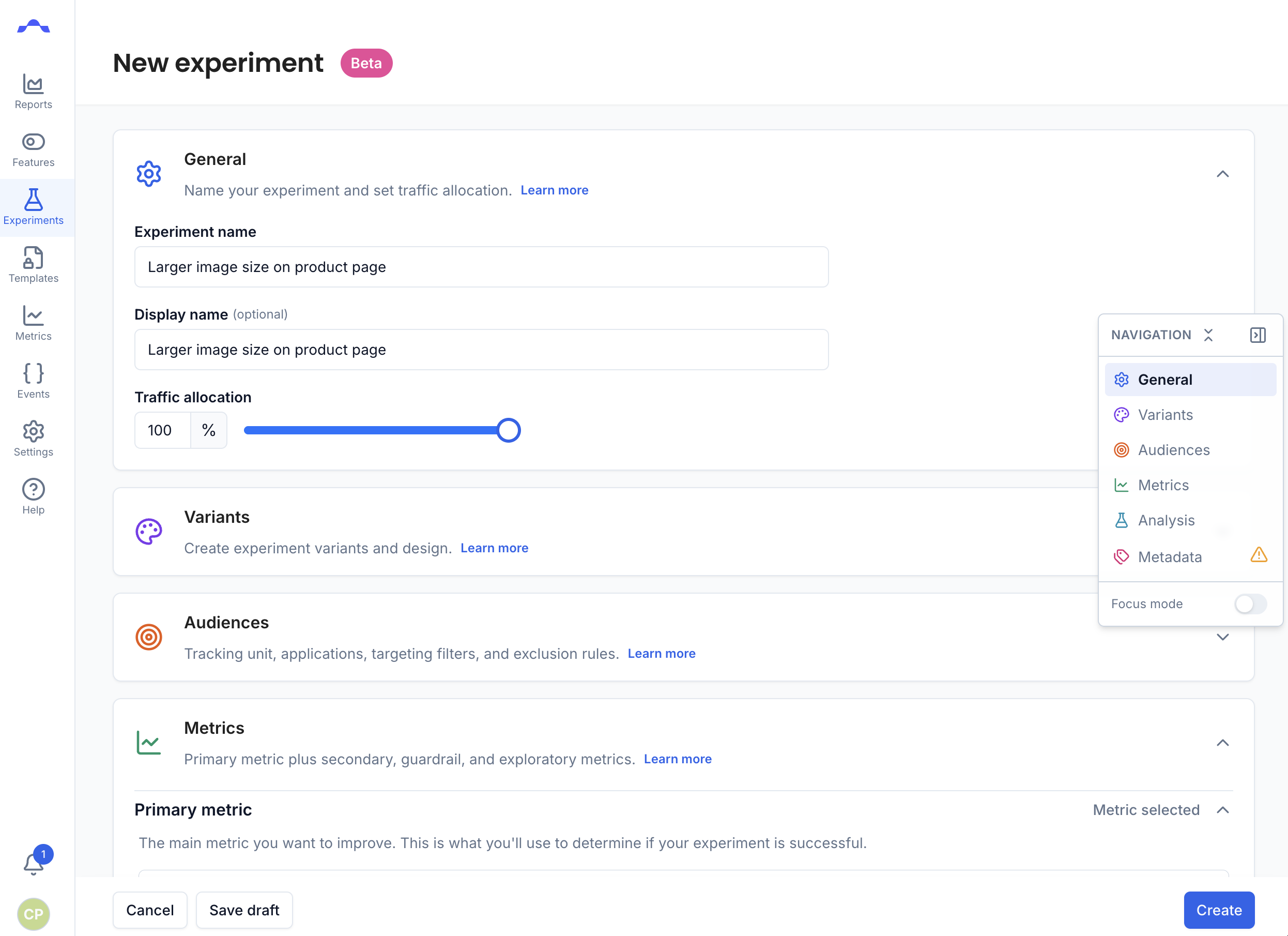
Enable the new experiment form from Platform Settings. Once enabled it applies to everyone on the account, and can be turned off again at any time. We'd love your feedback — please reach out via your usual support channel or drop us a line.
Customisable Stopped Reasons
The list of stop reasons shown when stopping an experiment, turning off a feature, or restarting a running experiment / full on is now fully customisable per account from platform settings.
Admins can create, edit and archive stop reasons to match how their organisation actually talks about aborts (regional teams, compliance, technical defects, etc.). Custom stop reasons are available in every relevant flow and feed directly into the Abort Reasons breakdown in the experiment Reports tab, so the data you get out matches the vocabulary you use internally.
Feature Flags
Feature Flag Changelog
Similar to Experiments, change logs are now also available for feature flags — every modification is captured over the flag's lifetime, so you can always see what changed, who changed it, and when, including changes to rollout configuration, targeting, and variants.
Metrics
Metric Usage Report (Beta)
Every metric now has a Usage Report (Beta) that answers, at a glance, where is this metric being used, by whom, and how is that changing over time?
The Usage Report is enabled from Platform Settings by turning on Metric usage tab. Keep in mind that turning it on enables the beta experience for all users on your account — it's not a per-user toggle. You can switch it off again at any time while we continue collecting feedback.
The report is built around three coordinated views:
- Usage Summary Panel — aggregate stats for the current filtered set: total and current usage, a breakdown by role (primary / secondary / guardrail), and top-5 breakdowns by team, application, and unit, with both absolute counts and percentages.
- Experiments & Features List — a sortable, paginated table of every experiment, feature and full on rollout using the metric (limited to assets the user has access to), with columns for type, state, applications, units, duration, participants, owners, metric version, usage type, impact, and confidence.
- Metric Adoption Over Time — a line/area chart showing how many experiments and features have adopted the metric over time, with monthly / quarterly bucket toggle and metric version releases overlaid as vertical markers so you can correlate adoption shifts with metric changes.
Together they give metric owners, analysts and governance teams a clear picture of a metric's footprint across the platform — useful for impact reviews, deprecations, and prioritising which metrics deserve investment.
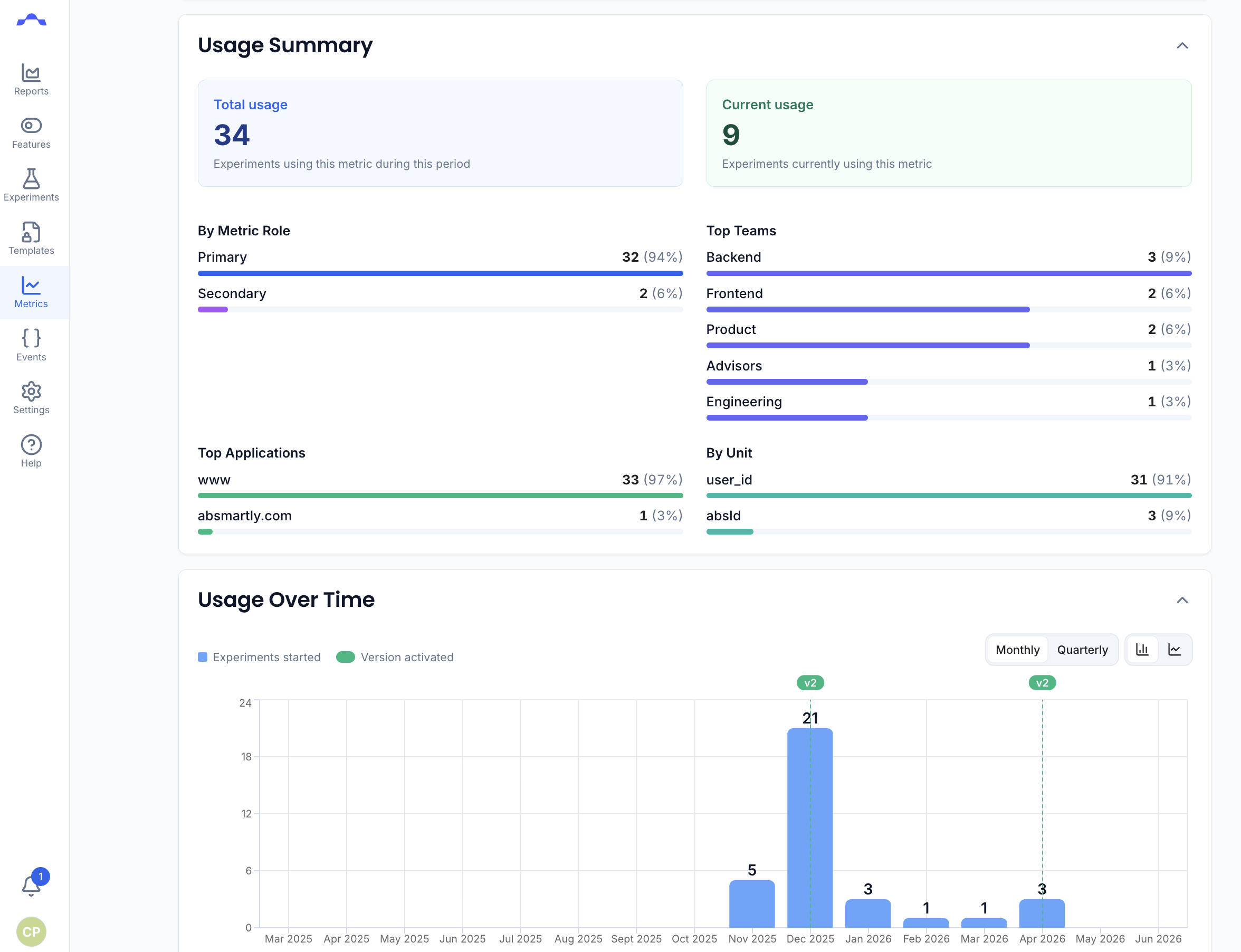
Enable the Metric Usage Report from Platform Settings by turning on Metric usage tab. Once enabled it applies to everyone on the account, and can be turned off again at any time. We'd love your feedback — please reach out via your usual support channel or drop us a line.
Platform
Data Retention Rollout Begins
In our November 2025 release notes we pre-announced upcoming data retention rules. With this release we're starting the gradual rollout of that policy:
- Goal, exposure and user attribute data will be retained for 1 year. Once an experiment has been stopped for a year or more, its raw event data will progressively age out and no longer be available for slicing and dicing.
- Experiment results remain available and visible — dashboards, decisions and historical reports are unaffected.
In practice this means you can still look up any past experiment and its outcome, but over the coming weeks you'll gradually stop being able to drill into fresh cuts of the underlying goal / exposure / attribute data for experiments stopped a year ago or more. We're rolling this out progressively so there's still time to flag concerns.
Export Lifecycle Webhooks
Exports now emit webhook events for every stage of their lifecycle, across all export types, so you can fully automate downloading, unzipping and importing experiment data into your own warehouse.
Two complementary sets of events are available:
- Per-export lifecycle —
ExportCreated,ExportStarted,ExportCompleted,ExportFailed,ExportRetrying,ExportCancelled. - Download availability —
ExportDownloadReadyfires the moment the zip file is ready to download.
A typical integration subscribes to ExportDownloadReady and, on each event, downloads the export via the API, unzips it, and ingests the data into the data warehouse — no polling required.
We've also fixed a race condition where a download file could be cleaned up immediately after the download redirect but before the actual download finished; the cleanup query now honours the full grace period for files that haven't been downloaded yet.
Bug Fixes
This release also includes a number of security, stability and reliability improvements based on feedback from users.
Questions or Feedback?
We're always happy to help, so reach out if you have any questions or want to explore how to make the most of these new capabilities.